INR 925.37INR 3700(macOS 11 or later)INR 925.37INR 3700(Compatible with Windows 10 & 11)
ONLY
2
2
2
2662
2
2662
2
2662
2
2662
2
2662
2
2662
2
2662
2
2662
2
2662
2
2662
2
2662
2
2662
2
2662
2
2662
2
2662
2
2662
2
2662
2
2662
2
2662
2
2662
2
2662
2
2662
2
2662
2
2662
2
2662
2
2662
2
2662
2
2662
2
2662
2
2662
2
2662
2
2662
2
2662
2
2662
2
2662
2
2662
2
2662
2
2662
2
2662
2
2662
2
2662
2
2662
2
2662
2
2662
2
2662
2
2662
2
2662
2
2662
2
2662
2
2662
2
2662
2
2662
2
2662
2
2662
2
2662
2
2662
2
2662
2
2662
2
2662
2
2662
2
2662
2
2662
2
2662
2
2662
2
2662
2
2662
2
2662
2
2662
2
2662
2
2662
2
2662
2
2662
2
2662
2
2662
2
2662
2
2662
2
2662
2
2662
2
2662
2
2662
2
2662
2
2662
2
2662
2
2662
2
2662
2
2662
2
2662
2
2662
2
2662
2
2662
2
2662
2
2662
2
2662
2
2662
2
2662
2
2662
2
2662
2
2662
2
2662
2
2662
2
2662
2
2662
2
2662
4
4
4
9
4
9
4
9
4
9
4
9
4
9
4
9
4
9
4
9
4
9
4
9
4
9
4
9
4
9
4
9
4
9
4
9
4
9
4
9
4
9
4
9
4
9
4
9
4
9
4
9
4
9
4
9
4
9
4
9
4
9
4
9
4
9
4
9
4
9
4
9
4
9
4
9
4
9
4
9
4
9
4
9
4
9
4
9
4
9
4
9
4
9
4
9
4
9
4
9
4
9
4
9
4
9
4
9
4
9
4
9
4
9
4
9
4
9
4
9
4
9
4
9
4
9
4
9
4
9
4
9
4
9
4
9
4
9
4
9
4
9
4
9
4
9
4
9
4
9
4
9
4
9
4
9
4
9
4
9
4
9
4
9
4
9
4
9
4
9
4
9
4
9
4
9
4
9
4
9
4
9
4
9
4
9
4
9
4
9
4
9
4
9
4
9
4
9
4
9
4
9
4
9
4
9
4
9
DAYS
0
0
5
5
HOURS
3
3
3
3
MINUTES
3
3
6
6
SECONDS
LEFT!
O que é Boom 3D?
Boom 3D para Mac e Windows é um aplicativo de aprimoramento de áudio profissional premiado, projetado para reproduzir seu conteúdo de mídia com incríveis efeitos 3D em QUALQUER fone de ouvido, de qualquer player, qualquer mídia ou serviço de streaming. Você não precisa de fones de ouvido caros ou amplificadores de som surround para sentir sua música!
Redefina sua experiência cinematográfica
Todos os seus filmes em surround 3D sem nenhum hardware caro ou amplificadores de alto-falante. Desde um sussurro distante a um som estridente, o Boom 3D captura cada detalhe, em toda a sua nitidez e clareza.
Refine a sua experiência musical
O som surround 3D da Boom converte sua área de trabalho em um amplificador de música, dando nova vida aos sons, trazendo clareza e graves profundos a cada nota, assim como um intensificador de graves ou um artista que deseja que sua música seja ouvida.
Redefinida seus jogos
Nosso áudio surround 3D multicanal traz clareza incomparável a cada interação. Com o Boom 3D, o jogo se torna uma experiência verdadeiramente envolvente!
Redefina sua experiência cinematográfica
Todos os seus filmes em surround 3D sem nenhum hardware caro ou amplificadores de alto-falante. Desde um sussurro distante a um som estridente, o Boom 3D captura cada detalhe, em toda a sua nitidez e clareza.
Refine a sua experiência musical
O som surround 3D da Boom converte sua área de trabalho em um amplificador de música, dando nova vida aos sons, trazendo clareza e graves profundos a cada nota, assim como um intensificador de graves ou um artista que deseja que sua música seja ouvida.
Redefinida seus jogos
Nosso áudio surround 3D multicanal traz clareza incomparável a cada interação. Com o Boom 3D, o jogo se torna uma experiência verdadeiramente envolvente!
Find Boom 3D on your favorite store.
It’s time to feel the realistic vibe of your audio!
Get more immersive and dynamic listening experience with 5.1 surround sound support in Boom 3D Mac.
Use headphones for a better experience.
5.1 Surround
Stereo
Its 5.1 surround sound to lure your senses!
Immerse yourself in an unforgettable audio experience with 5.1 multichannel audio support.
It’s time to feel the realistic vibe of your audio!
Download the 5.1 Extension for Netflix
*Use the 5.1 extension along with the Boom 3D desktop app for a lifeilike audio experience like no other.
Sinta o BOOM do seu som com nossos novos recursos!
Ajuste o áudio de todo o sistema com os recursos de aprimoramento de áudio de classe mundial do Boom
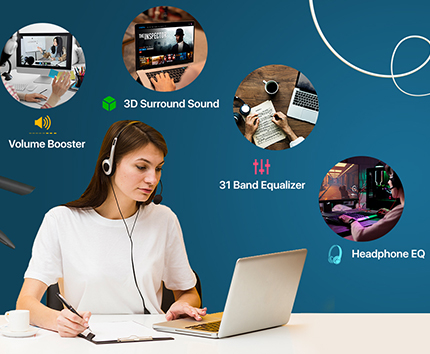
Surround 3D
Experimente filmes, jogos e música com a tecnologia 3D Surround que oferece um som surround virtual alucinante sem fones de ouvido especiais ou amplificadores de som surround caros para aumentar o volume.
Leia mais
Controles de equalização personalizados
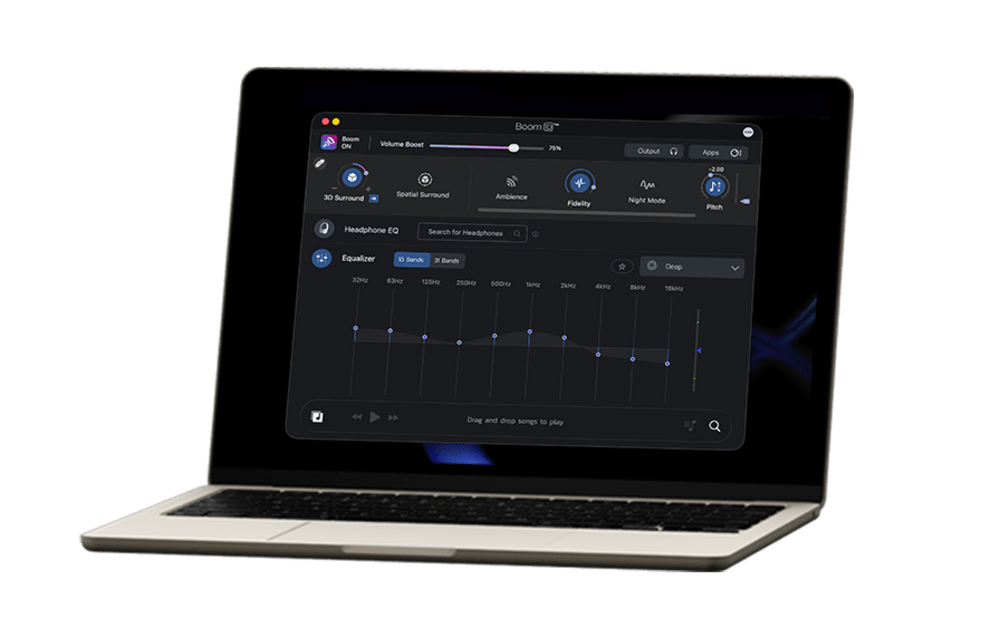
Um equalizador avançado de 31 bandas para um ajuste preciso de áudio. O Boom 3D para Mac e Windows também oferece uma variedade de predefinições cuidadosamente elaboradas para corresponder a diferentes gêneros e gostos individuais de audição.
Leia mais
Amplificadores de volume do Boom
(apenas para a versão Mac)
O Boom 3D for Mac é um amplificador de volume de áudio dinâmico que aumenta o volume com segurança além de seus limites regulares para fornecer uma experiência de áudio rica e intensa sem comprometer a qualidade do áudio.
Leia mais
Controlador de volume de áudio
O Boom 3D permite que você gerencie níveis e volumes de áudio de aplicativos individuais e tenha uma experiência ininterrupta de filmes/jogos/música.
Leia mais
Reprodutor de áudio de última geração
Reproduza suas músicas armazenadas com efeitos Boom imbatíveis com nosso reprodutor de áudio completo e crie listas de reprodução para organizar suas coleções de música, assim como seu próprio aplicativo reprodutor de música pessoal.
Leia mais
Mais de 20.000 estações de rádio
Junte-se ao Boom para desfrutar de acesso gratuito a mais de 20 mil estações de rádio da Internet locais e internacionais em 120 países.
Leia mais
Na mídia
“
Boom 3D is a very convenient utility that aims to improve the sound coming out of your PC
Boom 3D is a popular volume booster and equalizer app for Mac that offers fine-grained control over volume and audio output settings either system-wide or on a per app basis.
Boom 3D is the culmination of nearly a decade of innovation in the computer audio space, and it provides listeners with rich, immersive sound experiences.
From the videos on YouTube, Hulu, your favorite music playing on iTunes, to voice applications like Skype, iChat and your favorite Games, Boom can boost them all. Add to that the ability to boost audio and video files, you have a booming addition to your Mac.
It′s a system-wide volume booster and equalizer designed specifically for macOS. It’s also surprisingly good at squeezing fresh fidelity out of common Mac speakers and headphones.
“ Boom 3D is a very convenient utility that aims to improve the sound coming out of your PC ”
Rating
“ If you are looking to refine, redefine, re-imagine, and refresh your audio experience, Boom 3D is the app to consider! ”
Rating
“ Equalizer App For MacBook Pro, MacBook Air Can Make A Big Difference In Sound Quality: Boom 3D ”
Rating
“ Boom 3D is a popular volume booster and equalizer app for Mac that offers fine-grained control over volume and audio output settings either system-wide or on a per app basis. ”
Rating
5
“
Boom 3D is the culmination of nearly a decade of innovation in the computer audio space, and it provides listeners with rich, immersive sound experiences.
”
Rating
“ From the videos on YouTube, Hulu, your favorite music playing on iTunes, to voice applications like Skype, iChat and your favorite Games, Boom can boost them all. Add to that the ability to boost audio and video files, you have a booming addition to your Mac. ”
Rating
5
“ It′s a system-wide volume booster and equalizer designed specifically for macOS. It’s also surprisingly good at squeezing fresh fidelity out of common Mac speakers and headphones. ”
Rating
5
“ Boom 3D is an all-new pro audio app that delivers rich and immersive audio with 3D surround sound that makes any headphones sound awesome. ”
Rating
5
Prêmios e reconhecimentos
O Boom 3D está disponível para Windows e Mac
Mac
INR 925.37
15-Day Free Trial
Windows
INR 925.37
15-Day Free Trial
Mac
( macOS 11 or later )
Windows
( Windows 10 & later )
Avaliações e resenhas
Mac Store
4.5 / 5
Windows Store
4.5 / 5
Blogs
Mac
Windows
FAQs
What is Boom 3D?
Boom 3D is an audio enhancement app that improves sound quality on your Mac and Windows. It offers 3D surround sound and helps customize sound with other powerful features. Boom 3D offers an immersive, theatre-like experience on ANY headphones.
How does Boom 3D improve sound quality?
Boom 3D enhances sound quality using 3D surround sound to offer an immersive listening experience, and offers an equalizer to fine-tune sound settings. It enhances sound in real time, making music, movies, and games sound richer and more detailed.
Does Boom 3D work with all headphones and speakers?
Yes, Boom 3D works with almost all headphones and speakers. It is designed to enhance audio on any connected audio device. However, the experience may vary depending on the quality of your headphones.
Can Boom 3D improve sound on Spotify, Apple Music, YouTube, Netflix, and other apps?
Yes, Boom 3D works with all major apps. It enhances system-wide audio. Whether it’s music, videos, or streaming, the audio gets improved automatically with better clarity, bass, and 3D surround sound.
Is Boom 3D available for both Mac and Windows?
Yes, Boom 3D is available for both Mac and Windows. However, its features may vary between Mac and Windows.
What is 3D Surround Sound in Boom 3D?
One license activates on up to 4 devices across platforms; manage via your Boom account profile.
Can Boom 3D improve gaming audio?
Yes, Boom 3D helps gamers hear footsteps, explosions, and environmental sounds more clearly with its immersive 3D audio and custom EQ settings.
Does Boom 3D have an equalizer?
Yes, Boom 3D offers a 10-band or 31-band equalizer that lets you adjust different sound frequencies like bass, mids, and treble. It also offers ready-to-use presets, so you can quickly choose a sound style to customize to your preference.
Can I create custom EQ presets in Boom 3D?
Yes, you can create custom EQ presets in Boom 3D. You can adjust the equalizer settings to your liking and save them; you can reuse or edit them anytime.
Does Boom 3D support specific headphone models?
Boom 3D is compatible with ANY headphones. It also offers a Headphone EQ feature that supports over 5000 headphone models. This feature will automatically adjust sound to match each headphone's characteristics.
Is Boom 3D safe to use?
Yes, Boom 3D is safe to install and use. It does not damage your speakers or headphones when used responsibly
Why does music sound better with Boom 3D?
Music sounds better with Boom 3D because it enhances sound using 3D surround sound, equalizer tuning, and volume boosting. It makes vocals clearer, balances bass, and improves overall sound quality. Boom 3D adds depth and space to the audio, so the sound feels more immersive.
Can Boom 3D be used for movies and TV shows?
Yes, Boom 3D can be used for movies and TV shows. It helps enjoy clearer dialogue and immersive 3D surround sound, giving a theater-like experience at home.
How is Boom 3D different from a normal equalizer app?
Boom 3D does more than just adjust sound. It adds 3D surround sound, boosts volume, and enhances overall audio, not just frequencies.
Does Boom 3D work offline?
Yes, Boom 3D works offline. However, features like internet radio or updates will require internet access.
Is there a free trial for Boom 3D?
Boom 3D offers a 15-Day Free Trial without requiring a credit card or payment details.
Why does my music sound flat without Boom 3D?
It’s because the default system audio often lacks depth and bass. Without Boom 3D, sound stays basic, no surround sound effect, limited volume, and less clarity. So sound will feel less immersive compared to when Boom 3D adds details and depth.
Can Boom 3D improve bass?
Yes, Boom 3D includes a Bass Boost feature and EQ controls that make bass deeper and more powerful.
Can I use Boom 3D with external DACs or audio devices?
Yes, it works with external DACs, but using both together may affect sound quality.
Is Boom 3D good for content creators and video editors?
Yes, it’s good to monitor audio, but not for professional editing.
Why should I use Boom 3D?
You should download Boom 3D if you want to improve your system’s audio without upgrading your headphones or speakers. It adds depth and clarity to the audio, making it immersive with features like 3D surround sound, equalizer, and more.
How do I download Boom 3D?
Visit the official Global Delight’s website, download the Mac or Windows version, and install it on your device. You can also download the app from the App Store.
What is the best EQ setting for music in Boom 3D?
It all comes down to personal preference. You can adjust the settings based on what sounds best to you.
Which is better: Boom 3D or default sound settings?
Boom 3D is better for an enhanced listening experience, while default sound offers natural, unprocessed audio.
Baixar
Boom 2
Baixar
Boom 3D
Baixar
Boom
Be in the know.
Join our mailing list to hear about updates, feature additions, and special deals before anyone else!